---
title: Smart Fields
description: Smart Fields are organization-wide fields that can be inserted into any live document, to collect data.
---
[Skip to content](https://help.concord.app/hc/en-us/articles/360038387832-smart-fields#main-content)
English
Show submenu for translations

Open main navigation
Close main navigation
- English
Show submenu for translations
- Contact us
Contact us
How can we help you?
- There are no suggestions because the search field is empty.
1. [Concord Support Center](https://help.concord.app/?hsLang=en)
2. [Collaboration Functionality](https://help.concord.app/collaboration-functionality?hsLang=en)
3. [Administration](https://help.concord.app/collaboration-functionality?hsLang=en#administration)
# Smart Fields
## Smart Fields are organization-wide fields that can be inserted into any live document, to collect data.
The data entered into Smart Fields will automatically appear in the [Summary Sheet](https://help.concord.app/hc/en-us/articles/360036266731?hsLang=en), and can be included in custom [Reports](https://help.concord.app/hc/en-us/articles/360028245491?hsLang=en).
*Note: Smart fields are only available in Live editing mode, not in Word or PDF documents.*
### How to create a Smart Field
1. From your Document Inbox, click the lightning bolt symbol to open the **Automations** section.
2. Select **Smart Fields** on the left side panel.
3. Click **+ Add field.**
4. Enter a name for the Smart field. This field name will appear as placeholder text in the field when it is inserted into documents.
5. Select the Smart Field type. The Text type allows any text to be entered into the field. The Number type only permits numbers (and one period for a decimal) to be entered into the field. **Note that the field type cannot be changed once the Smart Field has been saved.**
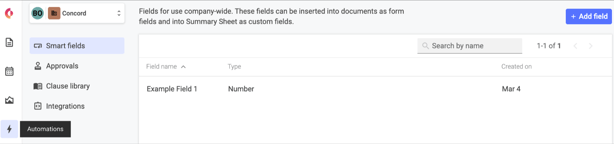
*Note: Smart Fields can be renamed but cannot be deleted from the Smart Fields list.*
### How to insert a Smart Field into a document
1. Internal creators (and Administrators) granted full [editing rights](https://support.concordnow.com/hc/en-us/articles/204479835-Sharing-a-Document-?hsLang=en) on a document can insert Smart Fields.
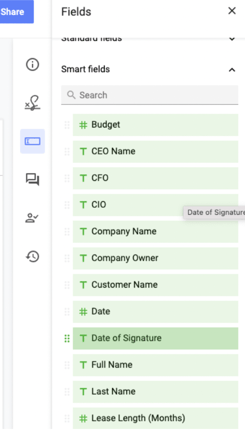
2. From the right-hand menu, select the **Smart** **fields** icon.
3. Choose the Smart Field that you would like added to the document.
4. Drag and drop the Smart Field into the desired location in your document.
#### 
### How to edit a Smart Field in a document
- Smart Fields can be edited by clicking them.
- The right-hand panel will allow you to change the assignment, make it required or optional to fill, or remove the Smart Field.
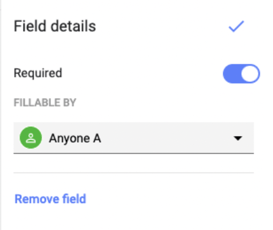
*Note: External guests with editing rights can delete a Smart field from a document, but they cannot insert Smart fields themselves.*
- [FAQs](https://help.concord.app/faqs?hsLang=en)
- [Document View](https://help.concord.app/document-view?hsLang=en)
- [Reports](https://help.concord.app/reports?hsLang=en#main-content)
- [Reports & Analytics](https://help.concord.app/reports?hsLang=en#reports-analytics)
- [Integrations](https://help.concord.app/integrations?hsLang=en)
- [Data & Analytics](https://help.concord.app/data-analytics?hsLang=en#main-content)
- [Reports & Analytics](https://help.concord.app/data-analytics?hsLang=en#reports-analytics)
- [Adding Users & User Roles](https://help.concord.app/adding-users-user-roles?hsLang=en#main-content)
- [Administration](https://help.concord.app/adding-users-user-roles?hsLang=en#administration)
- [Product Updates & Enhancements](https://help.concord.app/product-updates-enhancements?hsLang=en#main-content)
- [New Features](https://help.concord.app/product-updates-enhancements?hsLang=en#new-features)
- [Collaboration](https://help.concord.app/collaboration?hsLang=en#main-content)
- [Working in Concord](https://help.concord.app/collaboration?hsLang=en#working-in-concord)
- [Users and Sharing](https://help.concord.app/users-and-sharing?hsLang=en#main-content)
- [Working in Concord](https://help.concord.app/users-and-sharing?hsLang=en#working-in-concord)
- [Billing and Subscriptions](https://help.concord.app/billing-and-subscriptions?hsLang=en)
- [Managing Your Preferences](https://help.concord.app/managing-your-preferences?hsLang=en#main-content)
- [Setting Up Your Account](https://help.concord.app/managing-your-preferences?hsLang=en#setting-up-your-account)
- [Single Sign-On & Login Integrations](https://help.concord.app/single-sign-on-login-integrations?hsLang=en#main-content)
- [Integrations & API](https://help.concord.app/single-sign-on-login-integrations?hsLang=en#integrations-api)
- [Documents & Contracts](https://help.concord.app/documents-contracts?hsLang=en#main-content)
- [Working in Concord](https://help.concord.app/documents-contracts?hsLang=en#working-in-concord)
- [Templates](https://help.concord.app/templates?hsLang=en#main-content)
- [Working in Concord](https://help.concord.app/templates?hsLang=en#working-in-concord)
- [Approval Workflows](https://help.concord.app/approval-workflows?hsLang=en#main-content)
- [Working in Concord](https://help.concord.app/approval-workflows?hsLang=en#working-in-concord)
- [Account Settings](https://help.concord.app/account-settings?hsLang=en#main-content)
- [Administration](https://help.concord.app/account-settings?hsLang=en#administration)
- [Concord API](https://help.concord.app/concord-api?hsLang=en#main-content)
- [Integrations & API](https://help.concord.app/concord-api?hsLang=en#integrations-api)
- [Salesforce Integration](https://help.concord.app/salesforce-integration?hsLang=en#main-content)
- [Integrations & API](https://help.concord.app/salesforce-integration?hsLang=en#integrations-api)
- [Collaboration Functionality](https://help.concord.app/collaboration-functionality?hsLang=en#main-content)
- [Administration](https://help.concord.app/collaboration-functionality?hsLang=en#administration)
- [Managing Your Documents](https://help.concord.app/managing-your-documents?hsLang=en#main-content)
- [Setting Up Your Account](https://help.concord.app/managing-your-documents?hsLang=en#setting-up-your-account)
- [Automation Workflows](https://help.concord.app/automation-workflows?hsLang=en)
- [Intake Forms](https://help.concord.app/intake-forms?hsLang=en)
- [Deadlines management](https://help.concord.app/deadlines-management?hsLang=en)
- [AI](https://help.concord.app/ai?hsLang=en#main-content)
- [MCP](https://help.concord.app/ai?hsLang=en#mcp)
- [Agents](https://help.concord.app/agents?hsLang=en)
- [E-Signature](https://help.concord.app/e-signature?hsLang=en)
[](http://concordnow.com)
[mailto:email@email.com](mailto:email@email.com)
Copyright © 2026, Concord