---
title: Custom Approvals
description: The Approval Workflow feature automates the approval process, allowing internal users to approve or reject contracts before obtaining signatures.
---
[Skip to content](https://help.concord.app/hc/en-us/articles/360031321932-custom-approvals#main-content)
English
Show submenu for translations

Open main navigation
Close main navigation
- English
Show submenu for translations
- Contact us
Contact us
How can we help you?
- There are no suggestions because the search field is empty.
1. [Concord Support Center](https://help.concord.app/?hsLang=en)
2. [Approval Workflows](https://help.concord.app/approval-workflows?hsLang=en)
3. [Working in Concord](https://help.concord.app/approval-workflows?hsLang=en#working-in-concord)
# Custom Approvals
## The Approval Workflow feature automates the approval process, allowing internal users to approve or reject contracts before obtaining signatures.
Custom Workflows can be created and set at the **individual document level** on your **Templates** or documents in **Review**.
### Adding a Custom Workflow
Administrators and Users granted the right to perform this in their [Role](https://support.concordnow.com/hc/en-us/articles/205605529-Managing-roles?hsLang=en) could create or set an Approval Workflow in the Summary Sheet of a document.
### Add a Custom Workflow
- **Open** the document you would like to add approvals to
- In the right-hand panel, select the **Approvals** tab
- Click **Custom Approval
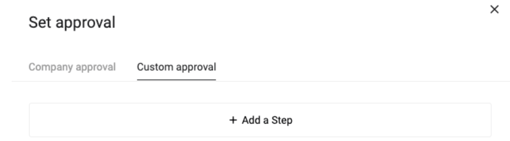**
- Click **Add a Step**
- **Mandatory step**: approval will always be required from the identified party.
- **Conditional step:** dependent on the values in [Smart Fields.](https://support.concordnow.com/hc/en-us/articles/360038387832?hsLang=en)
### Add A Conditional Step
- From the dropdown, select the field on which to base the conditional statement. For example, if you require the finance department's approval if a budget is over $100k, select the budget smart field.
- Choose the modifier from the dropdown, for example, 'greater than or equal to', and input the appropriate value.
- Select your Approver
- If you need multiple steps, click the '**+**' and repeat the above steps
- Requesting approval will also automatically share the designated approver to the document as an **Editor**. Their assigned permissions will not be adjusted if the document is shared with the designated approver before requesting approval.
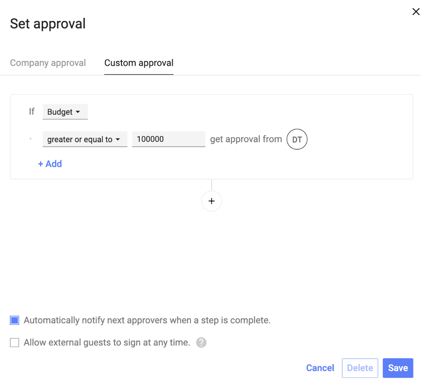
- **Automatically notify next approvers when a step is complete:** sends a notification to the inbox of the next person set to approve.
- **Allow external guests to sign at any time:** this allows external guests to sign even before the internal approval process has been completed.
- [FAQs](https://help.concord.app/faqs?hsLang=en)
- [Document View](https://help.concord.app/document-view?hsLang=en)
- [Reports](https://help.concord.app/reports?hsLang=en#main-content)
- [Reports & Analytics](https://help.concord.app/reports?hsLang=en#reports-analytics)
- [Integrations](https://help.concord.app/integrations?hsLang=en)
- [Data & Analytics](https://help.concord.app/data-analytics?hsLang=en#main-content)
- [Reports & Analytics](https://help.concord.app/data-analytics?hsLang=en#reports-analytics)
- [Adding Users & User Roles](https://help.concord.app/adding-users-user-roles?hsLang=en#main-content)
- [Administration](https://help.concord.app/adding-users-user-roles?hsLang=en#administration)
- [Product Updates & Enhancements](https://help.concord.app/product-updates-enhancements?hsLang=en#main-content)
- [New Features](https://help.concord.app/product-updates-enhancements?hsLang=en#new-features)
- [Collaboration](https://help.concord.app/collaboration?hsLang=en#main-content)
- [Working in Concord](https://help.concord.app/collaboration?hsLang=en#working-in-concord)
- [Users and Sharing](https://help.concord.app/users-and-sharing?hsLang=en#main-content)
- [Working in Concord](https://help.concord.app/users-and-sharing?hsLang=en#working-in-concord)
- [Billing and Subscriptions](https://help.concord.app/billing-and-subscriptions?hsLang=en)
- [Managing Your Preferences](https://help.concord.app/managing-your-preferences?hsLang=en#main-content)
- [Setting Up Your Account](https://help.concord.app/managing-your-preferences?hsLang=en#setting-up-your-account)
- [Single Sign-On & Login Integrations](https://help.concord.app/single-sign-on-login-integrations?hsLang=en#main-content)
- [Integrations & API](https://help.concord.app/single-sign-on-login-integrations?hsLang=en#integrations-api)
- [Documents & Contracts](https://help.concord.app/documents-contracts?hsLang=en#main-content)
- [Working in Concord](https://help.concord.app/documents-contracts?hsLang=en#working-in-concord)
- [Templates](https://help.concord.app/templates?hsLang=en#main-content)
- [Working in Concord](https://help.concord.app/templates?hsLang=en#working-in-concord)
- [Approval Workflows](https://help.concord.app/approval-workflows?hsLang=en#main-content)
- [Working in Concord](https://help.concord.app/approval-workflows?hsLang=en#working-in-concord)
- [Account Settings](https://help.concord.app/account-settings?hsLang=en#main-content)
- [Administration](https://help.concord.app/account-settings?hsLang=en#administration)
- [Concord API](https://help.concord.app/concord-api?hsLang=en#main-content)
- [Integrations & API](https://help.concord.app/concord-api?hsLang=en#integrations-api)
- [Salesforce Integration](https://help.concord.app/salesforce-integration?hsLang=en#main-content)
- [Integrations & API](https://help.concord.app/salesforce-integration?hsLang=en#integrations-api)
- [Collaboration Functionality](https://help.concord.app/collaboration-functionality?hsLang=en#main-content)
- [Administration](https://help.concord.app/collaboration-functionality?hsLang=en#administration)
- [Managing Your Documents](https://help.concord.app/managing-your-documents?hsLang=en#main-content)
- [Setting Up Your Account](https://help.concord.app/managing-your-documents?hsLang=en#setting-up-your-account)
- [Automation Workflows](https://help.concord.app/automation-workflows?hsLang=en)
- [Intake Forms](https://help.concord.app/intake-forms?hsLang=en)
- [Deadlines management](https://help.concord.app/deadlines-management?hsLang=en)
- [AI](https://help.concord.app/ai?hsLang=en#main-content)
- [MCP](https://help.concord.app/ai?hsLang=en#mcp)
- [Agents](https://help.concord.app/agents?hsLang=en)
- [E-Signature](https://help.concord.app/e-signature?hsLang=en)
[](http://concordnow.com)
[mailto:email@email.com](mailto:email@email.com)
Copyright © 2026, Concord