---
title: Document Filters
description: "From Filters on the Documents page, you can filter your documents by: Note that multiple filters can be used at once to filter documents with multiple parameters. To remove filters, click the 'x' ico"
---
[Skip to content](https://help.concord.app/hc/en-us/articles/360025005092-document-filters#main-content)
English
Show submenu for translations

Open main navigation
Close main navigation
- English
Show submenu for translations
- Contact us
Contact us
How can we help you?
- There are no suggestions because the search field is empty.
1. [Concord Support Center](https://help.concord.app/?hsLang=en)
2. [Documents & Contracts](https://help.concord.app/documents-contracts?hsLang=en)
3. [Working in Concord](https://help.concord.app/documents-contracts?hsLang=en#working-in-concord)
# Document Filters
From **Filters** on the Documents page, you can filter your documents by:
- Stage
- Tags
- Creator
- Document title
- Description
- Third-party
*Note that multiple filters can be used at once to filter documents with multiple parameters. *
To remove filters, click the 'x' icon on each filter added or select **Clear all** to the right of the filters.

### Filtering by Title, Description, or Third-Parties
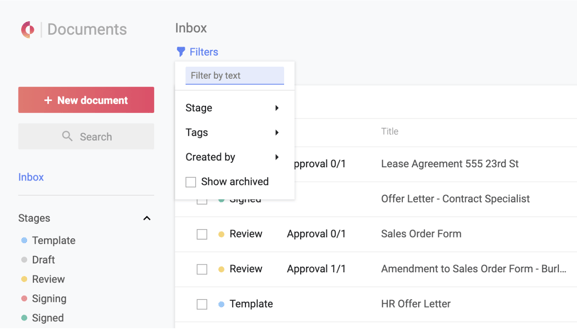
1. Navigate to your **Documents Page**
2. Click **Filters** in the top left-hand corner to open the Filters menu.
3. Enter text into the **Filter by text** field at the top of the menu and press Enter.
4. Additionally, you can filter your results further by selecting any Stage or Tag.
*Note that **Filter by text** does not search within the content of documents. The [search bar](https://help.concord.app/hc/en-us/articles/216537443?hsLang=en) at the top of the page will yield results that include text found within the **document content**.*
### Filtering by Stage

1. Navigate to your **Documents Page**
2. Click **Filters** in the top left-hand corner to open the Filters menu OR select a stage from the **Stages** section in the left sidebar.
3. Click **Stage**
4. Check the boxes beside the desired Stages.
*Note that [Archived documents](https://help.concord.app/hc/en-us/articles/205792845?hsLang=en)are included by default when filtering by stage from the **Stages** section in the left sidebar.*
### Filtering by Tags
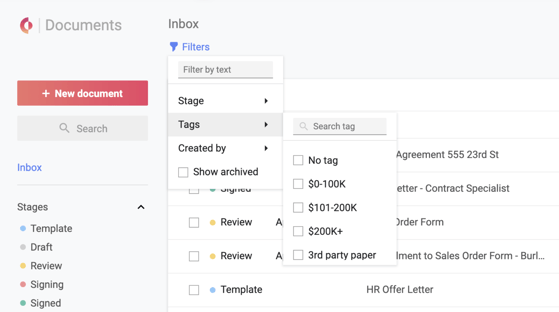
The tag filter can be used in addition to the tag entries found on the left-hand panel. The tag filter will yield results for documents that your team has tagged with one or more [document tags](https://support.concordnow.com/hc/en-us/articles/205605599-Managing-your-tags?hsLang=en) or **no tag.**
1. Navigate to your **Documents Page**
2. Click **Filters** in the top left-hand corner to open the Filters menu
3. Open the **Tags** menu
4. **Type** a tag into the search field or scroll to browse the list
5. **Check the checkboxes** beside the desired Tags
6. To remove individual tags, un-check the box beside the tag in the Filter menu or select **Clear all.**
*By selecting multiple tags, your results will not be widened but will become more specific. Search results will be documents that have been tagged with all of the selected tags. For example, by filtering for 'Finance' and 'HR,' only documents tagged with both 'Finance' and 'HR' will appear in the results.*
#### Learn more about [Global Search ](https://help.concord.app/hc/en-us/articles/216537443?hsLang=en)
- [FAQs](https://help.concord.app/faqs?hsLang=en)
- [Document View](https://help.concord.app/document-view?hsLang=en)
- [Reports](https://help.concord.app/reports?hsLang=en#main-content)
- [Reports & Analytics](https://help.concord.app/reports?hsLang=en#reports-analytics)
- [Integrations](https://help.concord.app/integrations?hsLang=en)
- [Data & Analytics](https://help.concord.app/data-analytics?hsLang=en#main-content)
- [Reports & Analytics](https://help.concord.app/data-analytics?hsLang=en#reports-analytics)
- [Adding Users & User Roles](https://help.concord.app/adding-users-user-roles?hsLang=en#main-content)
- [Administration](https://help.concord.app/adding-users-user-roles?hsLang=en#administration)
- [Product Updates & Enhancements](https://help.concord.app/product-updates-enhancements?hsLang=en#main-content)
- [New Features](https://help.concord.app/product-updates-enhancements?hsLang=en#new-features)
- [Collaboration](https://help.concord.app/collaboration?hsLang=en#main-content)
- [Working in Concord](https://help.concord.app/collaboration?hsLang=en#working-in-concord)
- [Users and Sharing](https://help.concord.app/users-and-sharing?hsLang=en#main-content)
- [Working in Concord](https://help.concord.app/users-and-sharing?hsLang=en#working-in-concord)
- [Billing and Subscriptions](https://help.concord.app/billing-and-subscriptions?hsLang=en)
- [Managing Your Preferences](https://help.concord.app/managing-your-preferences?hsLang=en#main-content)
- [Setting Up Your Account](https://help.concord.app/managing-your-preferences?hsLang=en#setting-up-your-account)
- [Single Sign-On & Login Integrations](https://help.concord.app/single-sign-on-login-integrations?hsLang=en#main-content)
- [Integrations & API](https://help.concord.app/single-sign-on-login-integrations?hsLang=en#integrations-api)
- [Documents & Contracts](https://help.concord.app/documents-contracts?hsLang=en#main-content)
- [Working in Concord](https://help.concord.app/documents-contracts?hsLang=en#working-in-concord)
- [Templates](https://help.concord.app/templates?hsLang=en#main-content)
- [Working in Concord](https://help.concord.app/templates?hsLang=en#working-in-concord)
- [Approval Workflows](https://help.concord.app/approval-workflows?hsLang=en#main-content)
- [Working in Concord](https://help.concord.app/approval-workflows?hsLang=en#working-in-concord)
- [Account Settings](https://help.concord.app/account-settings?hsLang=en#main-content)
- [Administration](https://help.concord.app/account-settings?hsLang=en#administration)
- [Concord API](https://help.concord.app/concord-api?hsLang=en#main-content)
- [Integrations & API](https://help.concord.app/concord-api?hsLang=en#integrations-api)
- [Salesforce Integration](https://help.concord.app/salesforce-integration?hsLang=en#main-content)
- [Integrations & API](https://help.concord.app/salesforce-integration?hsLang=en#integrations-api)
- [Collaboration Functionality](https://help.concord.app/collaboration-functionality?hsLang=en#main-content)
- [Administration](https://help.concord.app/collaboration-functionality?hsLang=en#administration)
- [Managing Your Documents](https://help.concord.app/managing-your-documents?hsLang=en#main-content)
- [Setting Up Your Account](https://help.concord.app/managing-your-documents?hsLang=en#setting-up-your-account)
- [Automation Workflows](https://help.concord.app/automation-workflows?hsLang=en)
- [Intake Forms](https://help.concord.app/intake-forms?hsLang=en)
- [Deadlines management](https://help.concord.app/deadlines-management?hsLang=en)
- [AI](https://help.concord.app/ai?hsLang=en#main-content)
- [MCP](https://help.concord.app/ai?hsLang=en#mcp)
- [Agents](https://help.concord.app/agents?hsLang=en)
- [E-Signature](https://help.concord.app/e-signature?hsLang=en)
[](http://concordnow.com)
[mailto:email@email.com](mailto:email@email.com)
Copyright © 2026, Concord