---
title: IP Allowlist
description: IP Whitelisting filters out who can access your Concord account based on their Internet Protocol or IP address. An IP address is a numerical label assigned to each device connected to a computer network.
---
[Skip to content](https://help.concord.app/hc/en-us/articles/360023105072-ip-allowlist#main-content)
English
Show submenu for translations

Open main navigation
Close main navigation
- English
Show submenu for translations
- Contact us
Contact us
How can we help you?
- There are no suggestions because the search field is empty.
1. [Concord Support Center](https://help.concord.app/?hsLang=en)
2. [Account Settings](https://help.concord.app/account-settings?hsLang=en)
3. [Administration](https://help.concord.app/account-settings?hsLang=en#administration)
# IP Allowlist
## IP Whitelisting filters out who can access your Concord account based on their Internet Protocol or IP address. An IP address is a numerical label assigned to each device connected to a computer network.
Concord can filter IPs at the time of login. Misconfiguring this setting can lead to users being inadvertently blocked from accessing their Concord accounts. For users with accounts linked to multiple companies, if one company has an IP whitelist activated and the user's IP doesn't appear on the allowlist, the connection will be refused.
- Contact your IT/network department for a list of valid IPs and IP ranges.
*Note: Companies that log in using a single sign-on service (Google, Facebook, Linked In, or Twitter) **cannot** allowlist IPs.*
### Setting up the IP Allowlist
Administrators can locate the IP whitelist in Company Preferences under Settings. If you do not add any IP address or ranges, any IP address will be permitted.
1. From the Home page, select the gear icon at the bottom left-hand corner
2. Select **Preferences** in the left-hand panel
3. Scroll to the bottom of the page to the **Network Access** section
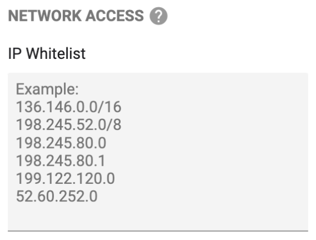
4. Enter a single IP address or an IP range per line and **Save**
*Note: **You must enter your current IP address**. Otherwise, you will be blocked from accessing your Concord account at your next login.*
### Deactivating the IP Whitelist
1. From the Home page, select the gear icon at the bottom left-hand corner
2. Select **Preferences** in the left-hand panel
3. Scroll to the bottom of the page to the **Network Access** section
4. Remove all IP addresses and ranges from the input and **Save**
*\*This feature is offered with some of our [paid plans.](https://www.concordnow.com/pricing/)*
- [FAQs](https://help.concord.app/faqs?hsLang=en)
- [Document View](https://help.concord.app/document-view?hsLang=en)
- [Reports](https://help.concord.app/reports?hsLang=en#main-content)
- [Reports & Analytics](https://help.concord.app/reports?hsLang=en#reports-analytics)
- [Integrations](https://help.concord.app/integrations?hsLang=en)
- [Data & Analytics](https://help.concord.app/data-analytics?hsLang=en#main-content)
- [Reports & Analytics](https://help.concord.app/data-analytics?hsLang=en#reports-analytics)
- [Adding Users & User Roles](https://help.concord.app/adding-users-user-roles?hsLang=en#main-content)
- [Administration](https://help.concord.app/adding-users-user-roles?hsLang=en#administration)
- [Product Updates & Enhancements](https://help.concord.app/product-updates-enhancements?hsLang=en#main-content)
- [New Features](https://help.concord.app/product-updates-enhancements?hsLang=en#new-features)
- [Collaboration](https://help.concord.app/collaboration?hsLang=en#main-content)
- [Working in Concord](https://help.concord.app/collaboration?hsLang=en#working-in-concord)
- [Users and Sharing](https://help.concord.app/users-and-sharing?hsLang=en#main-content)
- [Working in Concord](https://help.concord.app/users-and-sharing?hsLang=en#working-in-concord)
- [Billing and Subscriptions](https://help.concord.app/billing-and-subscriptions?hsLang=en)
- [Managing Your Preferences](https://help.concord.app/managing-your-preferences?hsLang=en#main-content)
- [Setting Up Your Account](https://help.concord.app/managing-your-preferences?hsLang=en#setting-up-your-account)
- [Single Sign-On & Login Integrations](https://help.concord.app/single-sign-on-login-integrations?hsLang=en#main-content)
- [Integrations & API](https://help.concord.app/single-sign-on-login-integrations?hsLang=en#integrations-api)
- [Documents & Contracts](https://help.concord.app/documents-contracts?hsLang=en#main-content)
- [Working in Concord](https://help.concord.app/documents-contracts?hsLang=en#working-in-concord)
- [Templates](https://help.concord.app/templates?hsLang=en#main-content)
- [Working in Concord](https://help.concord.app/templates?hsLang=en#working-in-concord)
- [Approval Workflows](https://help.concord.app/approval-workflows?hsLang=en#main-content)
- [Working in Concord](https://help.concord.app/approval-workflows?hsLang=en#working-in-concord)
- [Account Settings](https://help.concord.app/account-settings?hsLang=en#main-content)
- [Administration](https://help.concord.app/account-settings?hsLang=en#administration)
- [Concord API](https://help.concord.app/concord-api?hsLang=en#main-content)
- [Integrations & API](https://help.concord.app/concord-api?hsLang=en#integrations-api)
- [Salesforce Integration](https://help.concord.app/salesforce-integration?hsLang=en#main-content)
- [Integrations & API](https://help.concord.app/salesforce-integration?hsLang=en#integrations-api)
- [Collaboration Functionality](https://help.concord.app/collaboration-functionality?hsLang=en#main-content)
- [Administration](https://help.concord.app/collaboration-functionality?hsLang=en#administration)
- [Managing Your Documents](https://help.concord.app/managing-your-documents?hsLang=en#main-content)
- [Setting Up Your Account](https://help.concord.app/managing-your-documents?hsLang=en#setting-up-your-account)
- [Automation Workflows](https://help.concord.app/automation-workflows?hsLang=en)
- [Intake Forms](https://help.concord.app/intake-forms?hsLang=en)
- [Deadlines management](https://help.concord.app/deadlines-management?hsLang=en)
- [AI](https://help.concord.app/ai?hsLang=en#main-content)
- [MCP](https://help.concord.app/ai?hsLang=en#mcp)
- [Agents](https://help.concord.app/agents?hsLang=en)
- [E-Signature](https://help.concord.app/e-signature?hsLang=en)
[](http://concordnow.com)
[mailto:email@email.com](mailto:email@email.com)
Copyright © 2026, Concord