---
title: Commenting on a Document
description: Comments can help users collaborate and share ideas and suggestions related to the document and contract. The comments feature keeps conversations about the document in a single location, making it easier to reference later.
---
[Skip to content](https://help.concord.app/hc/en-us/articles/218238243-commenting-on-a-document#main-content)
English
Show submenu for translations

Open main navigation
Close main navigation
- English
Show submenu for translations
- Contact us
Contact us
How can we help you?
- There are no suggestions because the search field is empty.
1. [Concord Support Center](https://help.concord.app/?hsLang=en)
2. [Collaboration](https://help.concord.app/collaboration?hsLang=en)
3. [Working in Concord](https://help.concord.app/collaboration?hsLang=en#working-in-concord)
# Commenting on a Document
## Comments can help users collaborate and share ideas and suggestions related to the document and contract. The comments feature keeps conversations about the document in a single location, making it easier to reference later.
### To Add a Comment to a Document:
- Highlight the text you'd like to add a comment to
- Click on the **Comment icon** that appears to the right of the document

- Add your comment in the comment box. The highlighted text will appear in **grey**.

- Select viewing rights:
- **Public:** everyone on the document can see your comment)
- **Internal:** only members of your organization can see your comment *Note: Internal comments will be highlighted in yellow*
- Once you've made your comments, click the blue **Comment** button to post your comment
- Once a comment has been posted, you cannot change visibility.
### Replying to and resolving comments
To reply to a comment:
- Select the comment you'd like to respond to by clicking on the speech bubble icon in the text
- Enter your response in the Reply field and click the blue **Comment** button. The visibility of replies will remain the same as the initial comment.
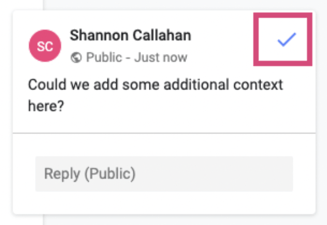
- When ready to **Resolve and Hide** a comment, select the comment you would like to resolve and click the blue **Check Mark**
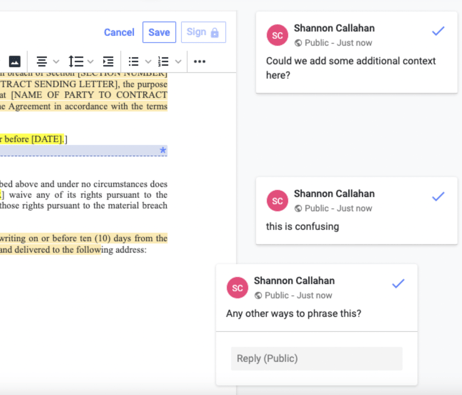
- **All Comments will remain visible on the right-hand side of the document until they are resolved.**
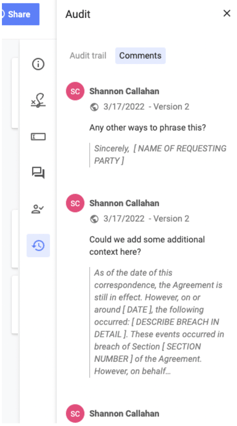
### Viewing Comment History
- All comments and replies made on the document can be viewed under the Audit tab by clicking **Audit** and **Comments.**
### Uploading Comments from Word
- Enter Edit mode on a document and select the **Import document** button from the editor toolbar, OR drag-and-drop the Word document onto your screen.
- Select your Word file using the **Browse** button in the import modal dialog.
- Click **Import**
- All comments imported are only visible internally
- [FAQs](https://help.concord.app/faqs?hsLang=en)
- [Document View](https://help.concord.app/document-view?hsLang=en)
- [Reports](https://help.concord.app/reports?hsLang=en#main-content)
- [Reports & Analytics](https://help.concord.app/reports?hsLang=en#reports-analytics)
- [Integrations](https://help.concord.app/integrations?hsLang=en)
- [Data & Analytics](https://help.concord.app/data-analytics?hsLang=en#main-content)
- [Reports & Analytics](https://help.concord.app/data-analytics?hsLang=en#reports-analytics)
- [Adding Users & User Roles](https://help.concord.app/adding-users-user-roles?hsLang=en#main-content)
- [Administration](https://help.concord.app/adding-users-user-roles?hsLang=en#administration)
- [Product Updates & Enhancements](https://help.concord.app/product-updates-enhancements?hsLang=en#main-content)
- [New Features](https://help.concord.app/product-updates-enhancements?hsLang=en#new-features)
- [Collaboration](https://help.concord.app/collaboration?hsLang=en#main-content)
- [Working in Concord](https://help.concord.app/collaboration?hsLang=en#working-in-concord)
- [Users and Sharing](https://help.concord.app/users-and-sharing?hsLang=en#main-content)
- [Working in Concord](https://help.concord.app/users-and-sharing?hsLang=en#working-in-concord)
- [Billing and Subscriptions](https://help.concord.app/billing-and-subscriptions?hsLang=en)
- [Managing Your Preferences](https://help.concord.app/managing-your-preferences?hsLang=en#main-content)
- [Setting Up Your Account](https://help.concord.app/managing-your-preferences?hsLang=en#setting-up-your-account)
- [Single Sign-On & Login Integrations](https://help.concord.app/single-sign-on-login-integrations?hsLang=en#main-content)
- [Integrations & API](https://help.concord.app/single-sign-on-login-integrations?hsLang=en#integrations-api)
- [Documents & Contracts](https://help.concord.app/documents-contracts?hsLang=en#main-content)
- [Working in Concord](https://help.concord.app/documents-contracts?hsLang=en#working-in-concord)
- [Templates](https://help.concord.app/templates?hsLang=en#main-content)
- [Working in Concord](https://help.concord.app/templates?hsLang=en#working-in-concord)
- [Approval Workflows](https://help.concord.app/approval-workflows?hsLang=en#main-content)
- [Working in Concord](https://help.concord.app/approval-workflows?hsLang=en#working-in-concord)
- [Account Settings](https://help.concord.app/account-settings?hsLang=en#main-content)
- [Administration](https://help.concord.app/account-settings?hsLang=en#administration)
- [Concord API](https://help.concord.app/concord-api?hsLang=en#main-content)
- [Integrations & API](https://help.concord.app/concord-api?hsLang=en#integrations-api)
- [Salesforce Integration](https://help.concord.app/salesforce-integration?hsLang=en#main-content)
- [Integrations & API](https://help.concord.app/salesforce-integration?hsLang=en#integrations-api)
- [Collaboration Functionality](https://help.concord.app/collaboration-functionality?hsLang=en#main-content)
- [Administration](https://help.concord.app/collaboration-functionality?hsLang=en#administration)
- [Managing Your Documents](https://help.concord.app/managing-your-documents?hsLang=en#main-content)
- [Setting Up Your Account](https://help.concord.app/managing-your-documents?hsLang=en#setting-up-your-account)
- [Automation Workflows](https://help.concord.app/automation-workflows?hsLang=en)
- [Intake Forms](https://help.concord.app/intake-forms?hsLang=en)
- [Deadlines management](https://help.concord.app/deadlines-management?hsLang=en)
- [AI](https://help.concord.app/ai?hsLang=en#main-content)
- [MCP](https://help.concord.app/ai?hsLang=en#mcp)
- [Agents](https://help.concord.app/agents?hsLang=en)
- [E-Signature](https://help.concord.app/e-signature?hsLang=en)
[](http://concordnow.com)
[mailto:email@email.com](mailto:email@email.com)
Copyright © 2026, Concord