---
title: Editing a Document
description: Concord gives you the flexibility to edit your documents online, and collaborate with other users in real time.
---
[Skip to content](https://help.concord.app/hc/en-us/articles/203736779-editing-a-document-#main-content)
English
Show submenu for translations

Open main navigation
Close main navigation
- English
Show submenu for translations
- Contact us
Contact us
How can we help you?
- There are no suggestions because the search field is empty.
1. [Concord Support Center](https://help.concord.app/?hsLang=en)
2. [Documents & Contracts](https://help.concord.app/documents-contracts?hsLang=en)
3. [Working in Concord](https://help.concord.app/documents-contracts?hsLang=en#working-in-concord)
# Editing a Document
## Concord gives you the flexibility to edit your documents online, and collaborate with other users in real time.
### How to edit a document in Concord
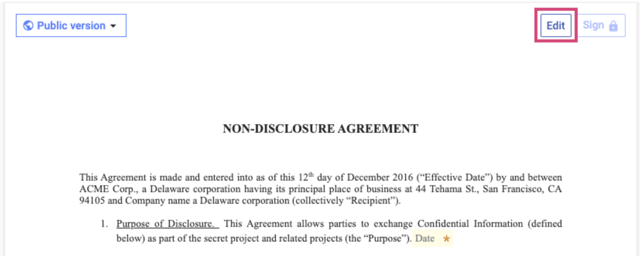
1. Create a new document or navigate to an existing document that you'd like to edit.
2. From the document toolbar, select **Edit**.
3. Revise the document, make changes, or add [attachments](https://help.concord.app/hc/en-us/articles/360061626072?hsLang=en).
4. Once your changes are complete, click **Save** at the top-right corner of the document to create a [new version](https://support.concordnow.com/hc/en-us/articles/205095925-Track-changes?hsLang=en).
### How to export a document to edit in Microsoft Word
- Download the document as a Microsoft Word file using the **Export** option from the top menu.
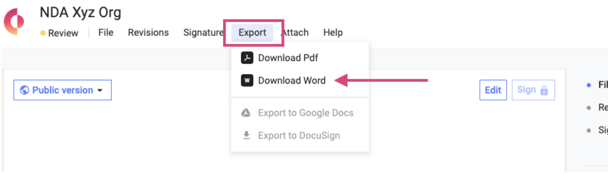
- Once you've downloaded your file, open it in Microsoft Word to make your edits, then save the document.
- When you're ready to bring the document back into Concord, select **File**, then **Import Word Document** from the top menu. You can also drag and drop the file directly into Concord.
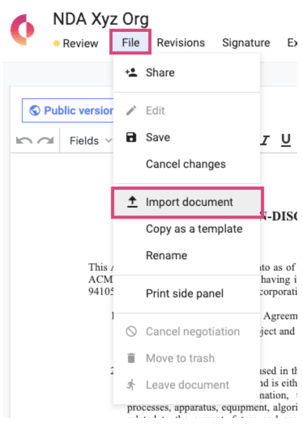
- When reimporting from Word, you will have the opportunity to bring the document in as a [Live Document](https://help.concord.app/hc/en-us/articles/360060950872?hsLang=en) (which can be edited online) or using [Word Mode](https://help.concord.app/hc/en-us/articles/360062025691?hsLang=en) (to preserve formatting).
- Once your document has been imported as a new version, click **Save.**
- Whenever you click the **Save** button, a new version of the document is created, and all parties on the document are automatically notified of the latest version. You can then view, [compare](https://help.concord.app/hc/en-us/articles/360020689112?hsLang=en), and [restore](https://support.concordnow.com/hc/en-us/articles/360020689112?hsLang=en) prior versions of the document by selecting the **Versions** button from the document toolbar.
- Additionally, users can post messages to the [Discussion Panel](https://help.concord.app/hc/en-us/articles/205958985-Discussion-Panel?hsLang=en) under the Discussion tab to collaborate with colleagues and negotiate with external guests.
- [FAQs](https://help.concord.app/faqs?hsLang=en)
- [Document View](https://help.concord.app/document-view?hsLang=en)
- [Reports](https://help.concord.app/reports?hsLang=en#main-content)
- [Reports & Analytics](https://help.concord.app/reports?hsLang=en#reports-analytics)
- [Integrations](https://help.concord.app/integrations?hsLang=en)
- [Data & Analytics](https://help.concord.app/data-analytics?hsLang=en#main-content)
- [Reports & Analytics](https://help.concord.app/data-analytics?hsLang=en#reports-analytics)
- [Adding Users & User Roles](https://help.concord.app/adding-users-user-roles?hsLang=en#main-content)
- [Administration](https://help.concord.app/adding-users-user-roles?hsLang=en#administration)
- [Product Updates & Enhancements](https://help.concord.app/product-updates-enhancements?hsLang=en#main-content)
- [New Features](https://help.concord.app/product-updates-enhancements?hsLang=en#new-features)
- [Collaboration](https://help.concord.app/collaboration?hsLang=en#main-content)
- [Working in Concord](https://help.concord.app/collaboration?hsLang=en#working-in-concord)
- [Users and Sharing](https://help.concord.app/users-and-sharing?hsLang=en#main-content)
- [Working in Concord](https://help.concord.app/users-and-sharing?hsLang=en#working-in-concord)
- [Billing and Subscriptions](https://help.concord.app/billing-and-subscriptions?hsLang=en)
- [Managing Your Preferences](https://help.concord.app/managing-your-preferences?hsLang=en#main-content)
- [Setting Up Your Account](https://help.concord.app/managing-your-preferences?hsLang=en#setting-up-your-account)
- [Single Sign-On & Login Integrations](https://help.concord.app/single-sign-on-login-integrations?hsLang=en#main-content)
- [Integrations & API](https://help.concord.app/single-sign-on-login-integrations?hsLang=en#integrations-api)
- [Documents & Contracts](https://help.concord.app/documents-contracts?hsLang=en#main-content)
- [Working in Concord](https://help.concord.app/documents-contracts?hsLang=en#working-in-concord)
- [Templates](https://help.concord.app/templates?hsLang=en#main-content)
- [Working in Concord](https://help.concord.app/templates?hsLang=en#working-in-concord)
- [Approval Workflows](https://help.concord.app/approval-workflows?hsLang=en#main-content)
- [Working in Concord](https://help.concord.app/approval-workflows?hsLang=en#working-in-concord)
- [Account Settings](https://help.concord.app/account-settings?hsLang=en#main-content)
- [Administration](https://help.concord.app/account-settings?hsLang=en#administration)
- [Concord API](https://help.concord.app/concord-api?hsLang=en#main-content)
- [Integrations & API](https://help.concord.app/concord-api?hsLang=en#integrations-api)
- [Salesforce Integration](https://help.concord.app/salesforce-integration?hsLang=en#main-content)
- [Integrations & API](https://help.concord.app/salesforce-integration?hsLang=en#integrations-api)
- [Collaboration Functionality](https://help.concord.app/collaboration-functionality?hsLang=en#main-content)
- [Administration](https://help.concord.app/collaboration-functionality?hsLang=en#administration)
- [Managing Your Documents](https://help.concord.app/managing-your-documents?hsLang=en#main-content)
- [Setting Up Your Account](https://help.concord.app/managing-your-documents?hsLang=en#setting-up-your-account)
- [Automation Workflows](https://help.concord.app/automation-workflows?hsLang=en)
- [Intake Forms](https://help.concord.app/intake-forms?hsLang=en)
- [Deadlines management](https://help.concord.app/deadlines-management?hsLang=en)
- [AI](https://help.concord.app/ai?hsLang=en#main-content)
- [MCP](https://help.concord.app/ai?hsLang=en#mcp)
- [Agents](https://help.concord.app/agents?hsLang=en)
- [E-Signature](https://help.concord.app/e-signature?hsLang=en)
[](http://concordnow.com)
[mailto:email@email.com](mailto:email@email.com)
Copyright © 2026, Concord