---
title: "Slack Integration (Beta): Notification Types"
description: Slack notification types related to Slack integration
---
[Skip to content](https://help.concord.app/concord-slack-integration-notification-types#main-content)
English
Show submenu for translations

Open main navigation
Close main navigation
- English
Show submenu for translations
- Contact us
Contact us
How can we help you?
- There are no suggestions because the search field is empty.
1. [Concord Support Center](https://help.concord.app/?hsLang=en)
2. [Integrations](https://help.concord.app/integrations?hsLang=en)
# Slack Integration (Beta): Notification Types
## The Slack integration allows you to receive real-time notifications about important contract events directly in your Slack workspace. This feature helps you stay informed about critical contract statuses without having to constantly check your Concord account.
**Note: The Slack integration is currently in Beta.**
#### Notification Types
Once you've set up the Slack integration, you'll automatically receive notifications in your configured Slack channel for the following contract events:
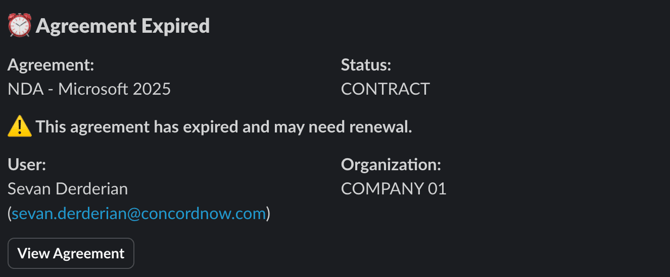
### 1. Contract Expiration Notifications
You'll receive a notification when a contract has expired in your Concord account.
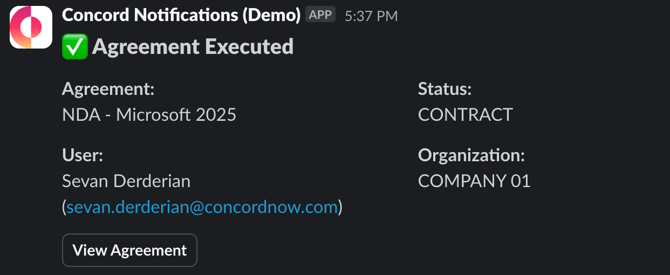
### 2. Fully Signed Contract Notifications
You'll receive a notification when a contract has been fully signed by all required parties.
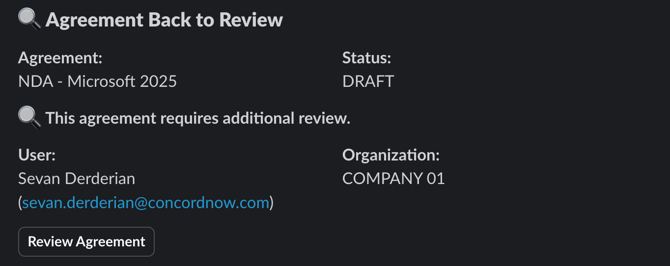
### 3. Canceled Signatures Notifications
You'll receive a notification when all signatures have been canceled and the contract has returned to the "Review" stage.
#### Notification Contents
Each notification includes the following information:
- **Agreement title**: The name of the contract
- **Agreement status**: The current status of the contract (DRAFT, NEGOTIATION, CONTRACT)
- **Organization concerned**: The relevant organization associated with the contract
- **User concerned**: The specific user associated with the contract action
- **"View Agreement" button**: A direct link that redirects you to the specific agreement in Concord
#### Managing Notifications
- All notifications are sent to the single Slack channel that was configured during the integration setup process.
- All three notification types are automatically sent; there are no customization options for selecting which types of notifications you receive.
#### **Why does this matter?**
The Slack integration notifications provide several benefits to your contract management workflow:
- **Immediate awareness**: Stay informed about critical contract events without constantly checking your Concord account
- **Quick access**: Jump directly to relevant contracts with one click using the "View agreement" button
- **Team visibility**: Everyone in the designated Slack channel can see important contract updates, improving team collaboration and awareness
- **Reduced risk**: Expired contract notifications help ensure you never miss an important renewal or termination date
Remember that the Slack integration is currently in Beta. Future updates may introduce additional notification types or customization options.
- [FAQs](https://help.concord.app/faqs?hsLang=en)
- [Document View](https://help.concord.app/document-view?hsLang=en)
- [Reports](https://help.concord.app/reports?hsLang=en#main-content)
- [Reports & Analytics](https://help.concord.app/reports?hsLang=en#reports-analytics)
- [Integrations](https://help.concord.app/integrations?hsLang=en)
- [Data & Analytics](https://help.concord.app/data-analytics?hsLang=en#main-content)
- [Reports & Analytics](https://help.concord.app/data-analytics?hsLang=en#reports-analytics)
- [Adding Users & User Roles](https://help.concord.app/adding-users-user-roles?hsLang=en#main-content)
- [Administration](https://help.concord.app/adding-users-user-roles?hsLang=en#administration)
- [Product Updates & Enhancements](https://help.concord.app/product-updates-enhancements?hsLang=en#main-content)
- [New Features](https://help.concord.app/product-updates-enhancements?hsLang=en#new-features)
- [Collaboration](https://help.concord.app/collaboration?hsLang=en#main-content)
- [Working in Concord](https://help.concord.app/collaboration?hsLang=en#working-in-concord)
- [Users and Sharing](https://help.concord.app/users-and-sharing?hsLang=en#main-content)
- [Working in Concord](https://help.concord.app/users-and-sharing?hsLang=en#working-in-concord)
- [Billing and Subscriptions](https://help.concord.app/billing-and-subscriptions?hsLang=en)
- [Managing Your Preferences](https://help.concord.app/managing-your-preferences?hsLang=en#main-content)
- [Setting Up Your Account](https://help.concord.app/managing-your-preferences?hsLang=en#setting-up-your-account)
- [Single Sign-On & Login Integrations](https://help.concord.app/single-sign-on-login-integrations?hsLang=en#main-content)
- [Integrations & API](https://help.concord.app/single-sign-on-login-integrations?hsLang=en#integrations-api)
- [Documents & Contracts](https://help.concord.app/documents-contracts?hsLang=en#main-content)
- [Working in Concord](https://help.concord.app/documents-contracts?hsLang=en#working-in-concord)
- [Templates](https://help.concord.app/templates?hsLang=en#main-content)
- [Working in Concord](https://help.concord.app/templates?hsLang=en#working-in-concord)
- [Approval Workflows](https://help.concord.app/approval-workflows?hsLang=en#main-content)
- [Working in Concord](https://help.concord.app/approval-workflows?hsLang=en#working-in-concord)
- [Account Settings](https://help.concord.app/account-settings?hsLang=en#main-content)
- [Administration](https://help.concord.app/account-settings?hsLang=en#administration)
- [Concord API](https://help.concord.app/concord-api?hsLang=en#main-content)
- [Integrations & API](https://help.concord.app/concord-api?hsLang=en#integrations-api)
- [Salesforce Integration](https://help.concord.app/salesforce-integration?hsLang=en#main-content)
- [Integrations & API](https://help.concord.app/salesforce-integration?hsLang=en#integrations-api)
- [Collaboration Functionality](https://help.concord.app/collaboration-functionality?hsLang=en#main-content)
- [Administration](https://help.concord.app/collaboration-functionality?hsLang=en#administration)
- [Managing Your Documents](https://help.concord.app/managing-your-documents?hsLang=en#main-content)
- [Setting Up Your Account](https://help.concord.app/managing-your-documents?hsLang=en#setting-up-your-account)
- [Automation Workflows](https://help.concord.app/automation-workflows?hsLang=en)
- [Intake Forms](https://help.concord.app/intake-forms?hsLang=en)
- [Deadlines management](https://help.concord.app/deadlines-management?hsLang=en)
- [AI](https://help.concord.app/ai?hsLang=en#main-content)
- [MCP](https://help.concord.app/ai?hsLang=en#mcp)
- [Agents](https://help.concord.app/agents?hsLang=en)
- [E-Signature](https://help.concord.app/e-signature?hsLang=en)
[](http://concordnow.com)
[mailto:email@email.com](mailto:email@email.com)
Copyright © 2026, Concord