---
title: "Concord MCP Server with ChatGPT: User Guide"
description: User Guide for Concord MCP with Chat GPT
---
[Skip to content](https://help.concord.app/concord-mcp-server-with-chatgpt-user-guide#main-content)
English
Show submenu for translations

Open main navigation
Close main navigation
- English
Show submenu for translations
- Contact us
Contact us
How can we help you?
- There are no suggestions because the search field is empty.
1. [Concord Support Center](https://help.concord.app/?hsLang=en)
2. [AI](https://help.concord.app/ai?hsLang=en)
3. [MCP](https://help.concord.app/ai?hsLang=en#mcp)
# Concord MCP Server with ChatGPT: User Guide
## Concords Model Context Protocol (MCP) connector allows you to work faster on contract tasks inside ChatGPT. Find agreements, run Q&A, summarize obligations, and create simple reports.
**Before you start**
- Your admin must have *Published* the “Concord” connector in your ChatGPT workspace.
- You need a **Concord account** (Viewer role is fine).
---
#### Connect your account
1. In ChatGPT, open **Settings → Apps & Connectors** and find **Concord** (Published by your admin).
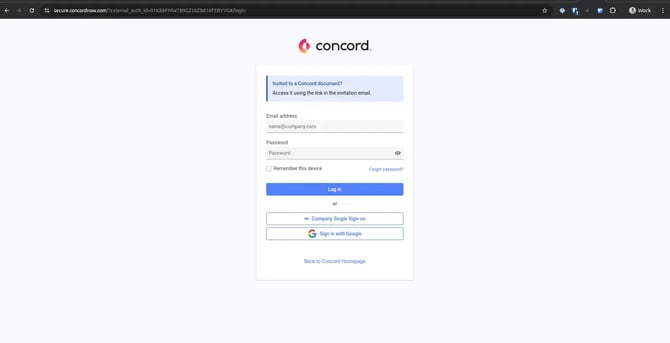
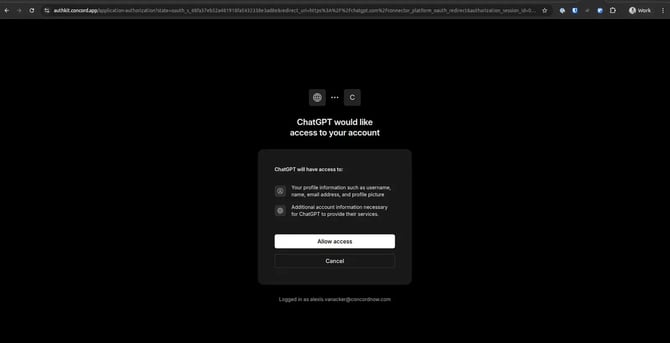
2. Click **Connect** and complete the Concord sign‑in and authorization.
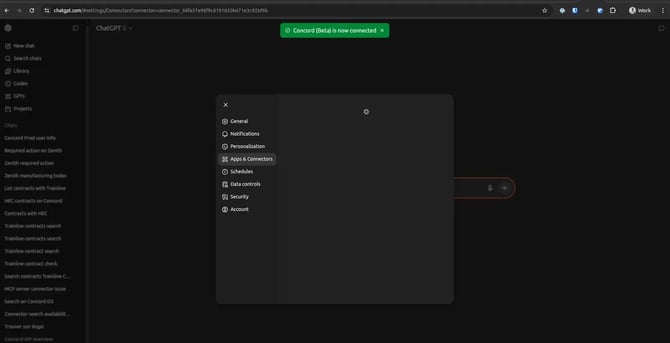
3. Return to ChatGPT; the connector shows **Connected**.
Find the published Concord connector in Apps & Connectors

Concord login during first‑time connection
Authorize ChatGPT to your Concord account
Connector shows Connected
#### Use the connector in chat
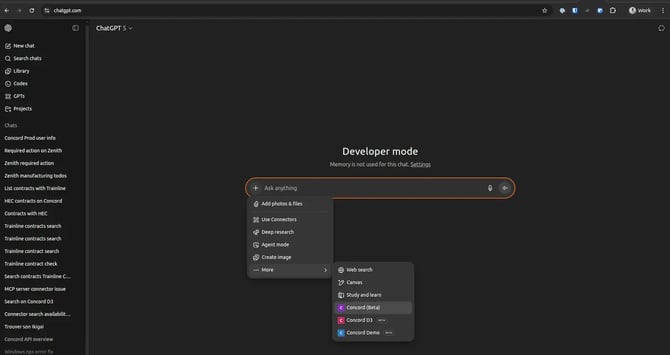
From any chat, click *Use Connectors* and pick **Concord**, or start typing and choose it from the quick‑pick.
Open the composer menu → Use Connectors
Then ask for what you need—for example:
- “Search for contracts about *Vendor X* signed last quarter.”
- “Summarize obligations in *Agreement Y*.”
- “Create a report for contracts expiring in 90 days.”
Your available actions depend on your Concord permissions. Viewers can use read‑only features like Contract Q&A and Advanced Search on documents they can access.
#### FAQ
**I don’t see the connector.**
Ask your ChatGPT admin to publish the Concord connector to your workspace.
**Do I need to enable anything inside Concord?**
No additional toggle is required today.
**What role is required?**
A Viewer seat is sufficient; you inherit your Concord permissions.
#### Troubleshooting
- **Connected but tools don’t run:** Disconnect and reconnect to refresh tokens.
- **Not authorized errors:** Request access from your Concord admin or ask them to run the action.
- **Unclear status during tool calls:** Try re‑running with a more specific prompt.
#### Security & Data
- Authentication uses OAuth to your own Concord account.
- No shared credentials; each user connects individually.
- Data access is governed by your Concord permissions.
- [FAQs](https://help.concord.app/faqs?hsLang=en)
- [Document View](https://help.concord.app/document-view?hsLang=en)
- [Reports](https://help.concord.app/reports?hsLang=en#main-content)
- [Reports & Analytics](https://help.concord.app/reports?hsLang=en#reports-analytics)
- [Integrations](https://help.concord.app/integrations?hsLang=en)
- [Data & Analytics](https://help.concord.app/data-analytics?hsLang=en#main-content)
- [Reports & Analytics](https://help.concord.app/data-analytics?hsLang=en#reports-analytics)
- [Adding Users & User Roles](https://help.concord.app/adding-users-user-roles?hsLang=en#main-content)
- [Administration](https://help.concord.app/adding-users-user-roles?hsLang=en#administration)
- [Product Updates & Enhancements](https://help.concord.app/product-updates-enhancements?hsLang=en#main-content)
- [New Features](https://help.concord.app/product-updates-enhancements?hsLang=en#new-features)
- [Collaboration](https://help.concord.app/collaboration?hsLang=en#main-content)
- [Working in Concord](https://help.concord.app/collaboration?hsLang=en#working-in-concord)
- [Users and Sharing](https://help.concord.app/users-and-sharing?hsLang=en#main-content)
- [Working in Concord](https://help.concord.app/users-and-sharing?hsLang=en#working-in-concord)
- [Billing and Subscriptions](https://help.concord.app/billing-and-subscriptions?hsLang=en)
- [Managing Your Preferences](https://help.concord.app/managing-your-preferences?hsLang=en#main-content)
- [Setting Up Your Account](https://help.concord.app/managing-your-preferences?hsLang=en#setting-up-your-account)
- [Single Sign-On & Login Integrations](https://help.concord.app/single-sign-on-login-integrations?hsLang=en#main-content)
- [Integrations & API](https://help.concord.app/single-sign-on-login-integrations?hsLang=en#integrations-api)
- [Documents & Contracts](https://help.concord.app/documents-contracts?hsLang=en#main-content)
- [Working in Concord](https://help.concord.app/documents-contracts?hsLang=en#working-in-concord)
- [Templates](https://help.concord.app/templates?hsLang=en#main-content)
- [Working in Concord](https://help.concord.app/templates?hsLang=en#working-in-concord)
- [Approval Workflows](https://help.concord.app/approval-workflows?hsLang=en#main-content)
- [Working in Concord](https://help.concord.app/approval-workflows?hsLang=en#working-in-concord)
- [Account Settings](https://help.concord.app/account-settings?hsLang=en#main-content)
- [Administration](https://help.concord.app/account-settings?hsLang=en#administration)
- [Concord API](https://help.concord.app/concord-api?hsLang=en#main-content)
- [Integrations & API](https://help.concord.app/concord-api?hsLang=en#integrations-api)
- [Salesforce Integration](https://help.concord.app/salesforce-integration?hsLang=en#main-content)
- [Integrations & API](https://help.concord.app/salesforce-integration?hsLang=en#integrations-api)
- [Collaboration Functionality](https://help.concord.app/collaboration-functionality?hsLang=en#main-content)
- [Administration](https://help.concord.app/collaboration-functionality?hsLang=en#administration)
- [Managing Your Documents](https://help.concord.app/managing-your-documents?hsLang=en#main-content)
- [Setting Up Your Account](https://help.concord.app/managing-your-documents?hsLang=en#setting-up-your-account)
- [Automation Workflows](https://help.concord.app/automation-workflows?hsLang=en)
- [Intake Forms](https://help.concord.app/intake-forms?hsLang=en)
- [Deadlines management](https://help.concord.app/deadlines-management?hsLang=en)
- [AI](https://help.concord.app/ai?hsLang=en#main-content)
- [MCP](https://help.concord.app/ai?hsLang=en#mcp)
- [Agents](https://help.concord.app/agents?hsLang=en)
- [E-Signature](https://help.concord.app/e-signature?hsLang=en)
[](http://concordnow.com)
[mailto:email@email.com](mailto:email@email.com)
Copyright © 2026, Concord