---
title: Bulk Import Contracts from DocuSign to Concord
description: Docusign document bulk upload to Concord
---
[Skip to content](https://help.concord.app/bulk-import-contracts-from-docusign-to-concord#main-content)
English
Show submenu for translations

Open main navigation
Close main navigation
- English
Show submenu for translations
- Contact us
Contact us
How can we help you?
- There are no suggestions because the search field is empty.
1. [Concord Support Center](https://help.concord.app/?hsLang=en)
2. [Integrations](https://help.concord.app/integrations?hsLang=en)
# Bulk Import Contracts from DocuSign to Concord
## The Bulk Import feature allows you to easily migrate multiple signed contracts from DocuSign into Concord in a single operation. This streamlines the transition process and helps maintain a single source of truth for all your contract management needs.
### **Prerequisites**
- You must have Administrator access in Concord
- You must have already connected your DocuSign account to Concord
### **Step-by-Step Instructions**
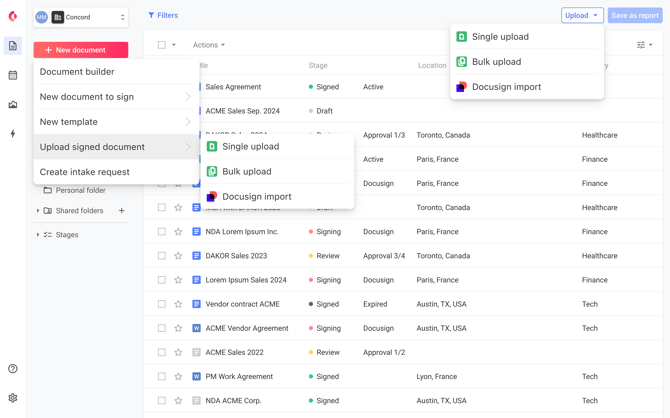
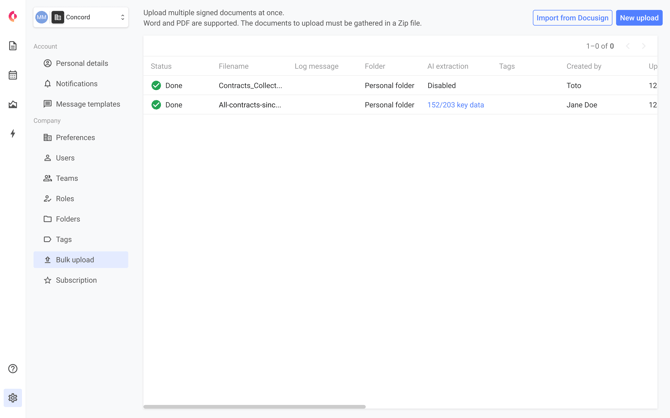
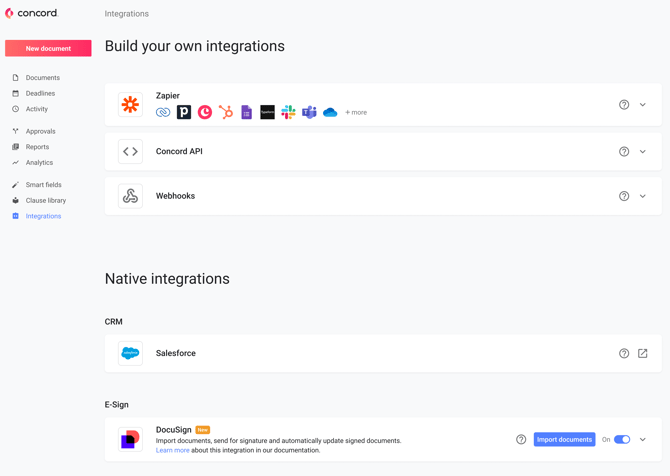
1. **Access the DocuSign Import Feature** You can access the Bulk Import feature in several ways:
- From the Inbox, click the "Upload" dropdown button and select "Import from DocuSign"
- From the Bulk Upload page, click the "Import from DocuSign" button
- From the Integrations page, find the DocuSign tile and click the "Import document" button
2. **Select DocuSign Folders** Browse and select one or multiple folders from your DocuSign account that contain the contracts you want to import.
3. **Specify Destination in Concord** Choose the destination folder(s) in Concord where you want the imported documents to be stored. You can:
- Select existing folders
- Create new folders as needed
4. **Initiate the Import Process** Click "Import" to begin the process. A progress indicator will show the status of your import.
5. **Review Import Results** Once the import is complete, you'll receive a summary report showing:
- Successfully imported documents
- Any documents that failed to import (with reasons)
- Option to retry failed imports
### **Why This Matters**
Bulk importing contracts from DocuSign saves you significant time compared to downloading and uploading each document individually. This feature:
- Eliminates manual, error-prone processes
- Ensures all historical contracts are properly migrated
- Provides a complete view of your contract portfolio in one system
- Accelerates your transition to Concord as your comprehensive contract management solution
### **FAQs**
**Q: Is there a limit to how many documents I can import at once?** A: Yes, the bulk import feature has the same document limit as Concord's standard bulk upload feature. If you exceed DocuSign's export limit, you'll receive a clear error message and can split your import into multiple operations.
**Q: Will I be notified when a large import is complete?** A: Yes, you'll receive an email notification when the import process completes. The email will include a summary of results and a link to access the detailed import report in Concord.
**Q: What happens if some documents fail to import?** A: If any documents fail to import, you'll receive a detailed report identifying which documents failed and why. You'll have the option to retry the failed imports.
**Q: Can I import documents from specific DocuSign folders?** A: Yes, you can select specific folders from your DocuSign account for import, allowing for organized migration of your contracts.
- [FAQs](https://help.concord.app/faqs?hsLang=en)
- [Document View](https://help.concord.app/document-view?hsLang=en)
- [Reports](https://help.concord.app/reports?hsLang=en#main-content)
- [Reports & Analytics](https://help.concord.app/reports?hsLang=en#reports-analytics)
- [Integrations](https://help.concord.app/integrations?hsLang=en)
- [Data & Analytics](https://help.concord.app/data-analytics?hsLang=en#main-content)
- [Reports & Analytics](https://help.concord.app/data-analytics?hsLang=en#reports-analytics)
- [Adding Users & User Roles](https://help.concord.app/adding-users-user-roles?hsLang=en#main-content)
- [Administration](https://help.concord.app/adding-users-user-roles?hsLang=en#administration)
- [Product Updates & Enhancements](https://help.concord.app/product-updates-enhancements?hsLang=en#main-content)
- [New Features](https://help.concord.app/product-updates-enhancements?hsLang=en#new-features)
- [Collaboration](https://help.concord.app/collaboration?hsLang=en#main-content)
- [Working in Concord](https://help.concord.app/collaboration?hsLang=en#working-in-concord)
- [Users and Sharing](https://help.concord.app/users-and-sharing?hsLang=en#main-content)
- [Working in Concord](https://help.concord.app/users-and-sharing?hsLang=en#working-in-concord)
- [Billing and Subscriptions](https://help.concord.app/billing-and-subscriptions?hsLang=en)
- [Managing Your Preferences](https://help.concord.app/managing-your-preferences?hsLang=en#main-content)
- [Setting Up Your Account](https://help.concord.app/managing-your-preferences?hsLang=en#setting-up-your-account)
- [Single Sign-On & Login Integrations](https://help.concord.app/single-sign-on-login-integrations?hsLang=en#main-content)
- [Integrations & API](https://help.concord.app/single-sign-on-login-integrations?hsLang=en#integrations-api)
- [Documents & Contracts](https://help.concord.app/documents-contracts?hsLang=en#main-content)
- [Working in Concord](https://help.concord.app/documents-contracts?hsLang=en#working-in-concord)
- [Templates](https://help.concord.app/templates?hsLang=en#main-content)
- [Working in Concord](https://help.concord.app/templates?hsLang=en#working-in-concord)
- [Approval Workflows](https://help.concord.app/approval-workflows?hsLang=en#main-content)
- [Working in Concord](https://help.concord.app/approval-workflows?hsLang=en#working-in-concord)
- [Account Settings](https://help.concord.app/account-settings?hsLang=en#main-content)
- [Administration](https://help.concord.app/account-settings?hsLang=en#administration)
- [Concord API](https://help.concord.app/concord-api?hsLang=en#main-content)
- [Integrations & API](https://help.concord.app/concord-api?hsLang=en#integrations-api)
- [Salesforce Integration](https://help.concord.app/salesforce-integration?hsLang=en#main-content)
- [Integrations & API](https://help.concord.app/salesforce-integration?hsLang=en#integrations-api)
- [Collaboration Functionality](https://help.concord.app/collaboration-functionality?hsLang=en#main-content)
- [Administration](https://help.concord.app/collaboration-functionality?hsLang=en#administration)
- [Managing Your Documents](https://help.concord.app/managing-your-documents?hsLang=en#main-content)
- [Setting Up Your Account](https://help.concord.app/managing-your-documents?hsLang=en#setting-up-your-account)
- [Automation Workflows](https://help.concord.app/automation-workflows?hsLang=en)
- [Intake Forms](https://help.concord.app/intake-forms?hsLang=en)
- [Deadlines management](https://help.concord.app/deadlines-management?hsLang=en)
- [AI](https://help.concord.app/ai?hsLang=en#main-content)
- [MCP](https://help.concord.app/ai?hsLang=en#mcp)
- [Agents](https://help.concord.app/agents?hsLang=en)
- [E-Signature](https://help.concord.app/e-signature?hsLang=en)
[](http://concordnow.com)
[mailto:email@email.com](mailto:email@email.com)
Copyright © 2026, Concord