---
title: Automatic Document Sync from DocuSign to Concord
description: DocuSign integration 2-way synchronization
---
[Skip to content](https://help.concord.app/automatic-document-sync-from-docusign-to-concord#main-content)
English
Show submenu for translations

Open main navigation
Close main navigation
- English
Show submenu for translations
- Contact us
Contact us
How can we help you?
- There are no suggestions because the search field is empty.
1. [Concord Support Center](https://help.concord.app/?hsLang=en)
2. [Integrations](https://help.concord.app/integrations?hsLang=en)
# Automatic Document Sync from DocuSign to Concord
## This article explains how signed documents in DocuSign automatically sync back to Concord, maintaining a complete contract lifecycle in a single system without manual intervention.
### **Prerequisites**
- You must have an active DocuSign integration with Concord
- The document must have been exported from Concord to DocuSign
### **How Automatic Document Sync Works**
1. **Document Signature in DocuSign** After all required parties have signed the document in DocuSign, the system automatically triggers the sync process.
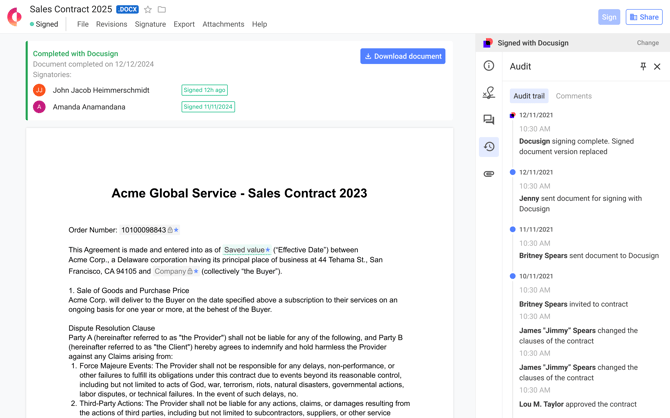
2. **Automatic Return to Concord** The signed document automatically syncs back to Concord in PDF format.
3. **Status Update in Concord** The document status in Concord automatically updates to "Signed" once the sync is complete.
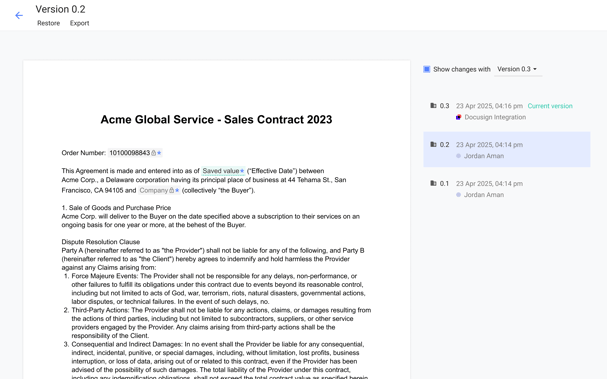
4. **Version History Preservation** The returning document updates the original document in Concord while preserving the complete version history.
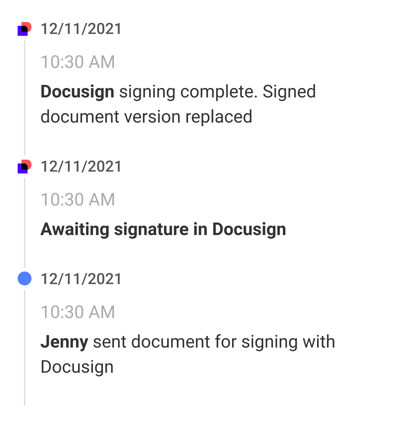
5. **Audit Trail Updates** The Concord audit trail is updated with all actions from DocuSign, including:
- Document exported to DocuSign
- Document sent for signature in DocuSign
- Document fully signed in DocuSign
6. **Notification to Stakeholders** When the document is fully signed and synced back to Concord, email notifications are sent to all internal users with access to the document.
### **Why This Matters**
Automatic document sync eliminates manual steps and provides several benefits:
- Prevents version control issues between systems
- Maintains Concord as the single source of truth for all contracts
- Eliminates the risk of human error in the document return process
- Creates a complete and unbroken audit trail of the entire contract lifecycle
- Ensures all stakeholders are promptly notified when contracts are fully executed
### **FAQs**
**Q: Can I view the DocuSign audit trail in Concord?** A: Yes, the audit trail in Concord is updated with all DocuSign events, providing a complete history of the document's journey through both systems.
**Q: Will I receive notifications when the document is signed in DocuSign?** A: Yes, DocuSign signatures trigger the same Concord signature email notifications when the agreement is fully executed.
**Q: Are access rights maintained when the document syncs back?** A: Yes, all access rights to the document in Concord are maintained after the signed document is synced back from DocuSign.
**Q: Can users without DocuSign integration see the audit trail?** A: Yes, the audit trail that contains DocuSign events is accessible to all users with access to the document, even without active DocuSign integration, for clarity and legal purposes.
- [FAQs](https://help.concord.app/faqs?hsLang=en)
- [Document View](https://help.concord.app/document-view?hsLang=en)
- [Reports](https://help.concord.app/reports?hsLang=en#main-content)
- [Reports & Analytics](https://help.concord.app/reports?hsLang=en#reports-analytics)
- [Integrations](https://help.concord.app/integrations?hsLang=en)
- [Data & Analytics](https://help.concord.app/data-analytics?hsLang=en#main-content)
- [Reports & Analytics](https://help.concord.app/data-analytics?hsLang=en#reports-analytics)
- [Adding Users & User Roles](https://help.concord.app/adding-users-user-roles?hsLang=en#main-content)
- [Administration](https://help.concord.app/adding-users-user-roles?hsLang=en#administration)
- [Product Updates & Enhancements](https://help.concord.app/product-updates-enhancements?hsLang=en#main-content)
- [New Features](https://help.concord.app/product-updates-enhancements?hsLang=en#new-features)
- [Collaboration](https://help.concord.app/collaboration?hsLang=en#main-content)
- [Working in Concord](https://help.concord.app/collaboration?hsLang=en#working-in-concord)
- [Users and Sharing](https://help.concord.app/users-and-sharing?hsLang=en#main-content)
- [Working in Concord](https://help.concord.app/users-and-sharing?hsLang=en#working-in-concord)
- [Billing and Subscriptions](https://help.concord.app/billing-and-subscriptions?hsLang=en)
- [Managing Your Preferences](https://help.concord.app/managing-your-preferences?hsLang=en#main-content)
- [Setting Up Your Account](https://help.concord.app/managing-your-preferences?hsLang=en#setting-up-your-account)
- [Single Sign-On & Login Integrations](https://help.concord.app/single-sign-on-login-integrations?hsLang=en#main-content)
- [Integrations & API](https://help.concord.app/single-sign-on-login-integrations?hsLang=en#integrations-api)
- [Documents & Contracts](https://help.concord.app/documents-contracts?hsLang=en#main-content)
- [Working in Concord](https://help.concord.app/documents-contracts?hsLang=en#working-in-concord)
- [Templates](https://help.concord.app/templates?hsLang=en#main-content)
- [Working in Concord](https://help.concord.app/templates?hsLang=en#working-in-concord)
- [Approval Workflows](https://help.concord.app/approval-workflows?hsLang=en#main-content)
- [Working in Concord](https://help.concord.app/approval-workflows?hsLang=en#working-in-concord)
- [Account Settings](https://help.concord.app/account-settings?hsLang=en#main-content)
- [Administration](https://help.concord.app/account-settings?hsLang=en#administration)
- [Concord API](https://help.concord.app/concord-api?hsLang=en#main-content)
- [Integrations & API](https://help.concord.app/concord-api?hsLang=en#integrations-api)
- [Salesforce Integration](https://help.concord.app/salesforce-integration?hsLang=en#main-content)
- [Integrations & API](https://help.concord.app/salesforce-integration?hsLang=en#integrations-api)
- [Collaboration Functionality](https://help.concord.app/collaboration-functionality?hsLang=en#main-content)
- [Administration](https://help.concord.app/collaboration-functionality?hsLang=en#administration)
- [Managing Your Documents](https://help.concord.app/managing-your-documents?hsLang=en#main-content)
- [Setting Up Your Account](https://help.concord.app/managing-your-documents?hsLang=en#setting-up-your-account)
- [Automation Workflows](https://help.concord.app/automation-workflows?hsLang=en)
- [Intake Forms](https://help.concord.app/intake-forms?hsLang=en)
- [Deadlines management](https://help.concord.app/deadlines-management?hsLang=en)
- [AI](https://help.concord.app/ai?hsLang=en#main-content)
- [MCP](https://help.concord.app/ai?hsLang=en#mcp)
- [Agents](https://help.concord.app/agents?hsLang=en)
- [E-Signature](https://help.concord.app/e-signature?hsLang=en)
[](http://concordnow.com)
[mailto:email@email.com](mailto:email@email.com)
Copyright © 2026, Concord