---
title: Configure Concord MCP Server with ChatGPT
description: This is an Admin Guide for setting up the Concord MCP Server.
---
[Skip to content](https://help.concord.app/-configure-concord-mcp-server-with-chatgpt#main-content)
English
Show submenu for translations

Open main navigation
Close main navigation
- English
Show submenu for translations
- Contact us
Contact us
How can we help you?
- There are no suggestions because the search field is empty.
1. [Concord Support Center](https://help.concord.app/?hsLang=en)
2. [AI](https://help.concord.app/ai?hsLang=en)
3. [MCP](https://help.concord.app/ai?hsLang=en#mcp)
# Configure Concord MCP Server with ChatGPT
## Concord's Model Context Protocol (MCP) connector makes Concord CLM securely available inside ChatGPT so teams can search, summarize, and act on contracts with natural language, using OAuth and existing Concord permissions.
**Who this doc is for:** ChatGPT workspace admins who will enable Developer mode, create the custom MCP connector, and publish it for the organization.
**What this covers**
- Enable ChatGPT *Developer mode* and create a custom MCP connector.
- Point it to the Concord MCP server and test the connection.
- Publish the connector so it appears for your entire ChatGPT workspace.
**MCP Server URL:** `https://mcp.concord.app/mcp`
---
#### Prerequisites
- Admin access to your **ChatGPT workspace**.
- A **Concord account** (Viewer role is sufficient).
- ChatGPT **Developer mode** enabled.
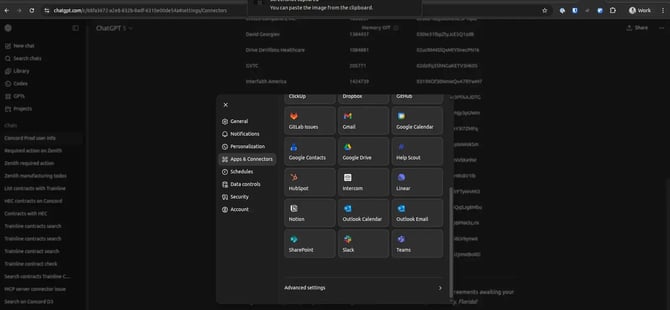
#### 1) Open ChatGPT settings → Apps & Connectors
Settings → Apps & Connectors catalog
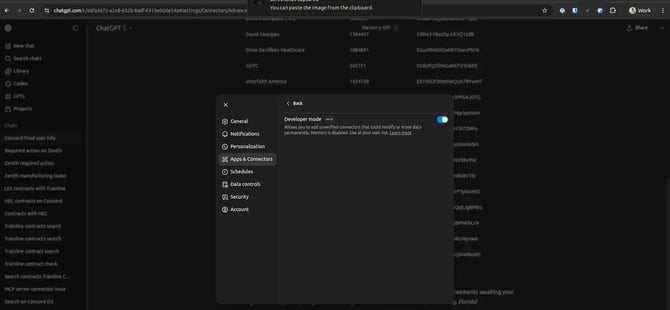
#### 2) Enable Developer mode
Developer mode allows adding custom (unverified) MCP connectors.
Advanced settings → Enable Developer mode
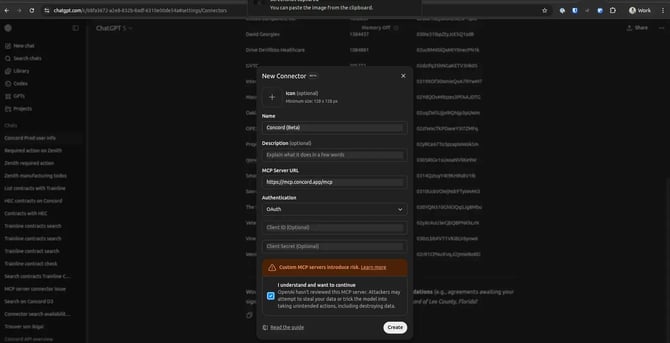
#### 3) Create the connector
Click Create and fill the form:
- **Name:** “Concord (Beta)” or “Concord CLM”
- **MCP Server URL:** `https://mcp.concord.app/mcp`
- **Authentication:** OAuth (leave Client ID/Secret blank)
- Acknowledge the standard MCP warning.
Create New Connector — form
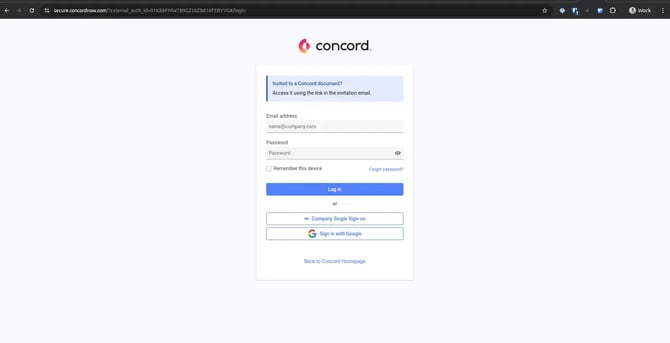
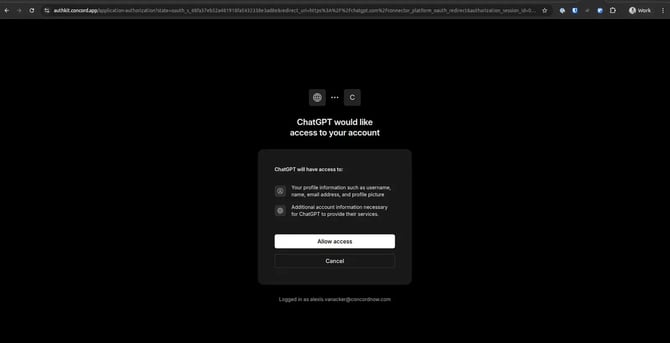
#### 4) Sign in & authorize
You’ll be redirected to Concord for OAuth. Sign in and click *Allow access*.
Concord login (SSO/Google supported)
Authorize ChatGPT to access your Concord account
#### 5) Confirm connection (private)
After connecting, the connector is available *only to you* (the creator) until it is published.
#### 6) Publish to your workspace
Publishing makes the connector visible to everyone in your ChatGPT organization. Each user must still click **Connect** once so the connector uses their own Concord credentials and permissions.
Connector actions menu → Publish

#### FAQ
**Do we need to enable anything inside Concord?**
No additional toggle is required today. OAuth and permission checks occur automatically.
**What role is required in Concord?**
A *Viewer* seat is sufficient for setup; users inherit capabilities based on their Concord role.
#### Troubleshooting
- **No Create button:** You may lack ChatGPT org admin rights. Ask an admin to create/publish.
- **403 / Not authorized when running a tool:** Your Concord role disallows that action; request access or try read‑only queries.
- **Tool calls seem to “hang”:** ChatGPT UI offers limited live feedback; retry with a more specific prompt.
#### Security & Data
- Authentication uses OAuth to your own Concord account; actions run under your permissions.
- No shared credentials. Each user connects individually after publish.
- Published connectors are visible org‑wide in ChatGPT; Concord permissions still control data access.
- [FAQs](https://help.concord.app/faqs?hsLang=en)
- [Document View](https://help.concord.app/document-view?hsLang=en)
- [Reports](https://help.concord.app/reports?hsLang=en#main-content)
- [Reports & Analytics](https://help.concord.app/reports?hsLang=en#reports-analytics)
- [Integrations](https://help.concord.app/integrations?hsLang=en)
- [Data & Analytics](https://help.concord.app/data-analytics?hsLang=en#main-content)
- [Reports & Analytics](https://help.concord.app/data-analytics?hsLang=en#reports-analytics)
- [Adding Users & User Roles](https://help.concord.app/adding-users-user-roles?hsLang=en#main-content)
- [Administration](https://help.concord.app/adding-users-user-roles?hsLang=en#administration)
- [Product Updates & Enhancements](https://help.concord.app/product-updates-enhancements?hsLang=en#main-content)
- [New Features](https://help.concord.app/product-updates-enhancements?hsLang=en#new-features)
- [Collaboration](https://help.concord.app/collaboration?hsLang=en#main-content)
- [Working in Concord](https://help.concord.app/collaboration?hsLang=en#working-in-concord)
- [Users and Sharing](https://help.concord.app/users-and-sharing?hsLang=en#main-content)
- [Working in Concord](https://help.concord.app/users-and-sharing?hsLang=en#working-in-concord)
- [Billing and Subscriptions](https://help.concord.app/billing-and-subscriptions?hsLang=en)
- [Managing Your Preferences](https://help.concord.app/managing-your-preferences?hsLang=en#main-content)
- [Setting Up Your Account](https://help.concord.app/managing-your-preferences?hsLang=en#setting-up-your-account)
- [Single Sign-On & Login Integrations](https://help.concord.app/single-sign-on-login-integrations?hsLang=en#main-content)
- [Integrations & API](https://help.concord.app/single-sign-on-login-integrations?hsLang=en#integrations-api)
- [Documents & Contracts](https://help.concord.app/documents-contracts?hsLang=en#main-content)
- [Working in Concord](https://help.concord.app/documents-contracts?hsLang=en#working-in-concord)
- [Templates](https://help.concord.app/templates?hsLang=en#main-content)
- [Working in Concord](https://help.concord.app/templates?hsLang=en#working-in-concord)
- [Approval Workflows](https://help.concord.app/approval-workflows?hsLang=en#main-content)
- [Working in Concord](https://help.concord.app/approval-workflows?hsLang=en#working-in-concord)
- [Account Settings](https://help.concord.app/account-settings?hsLang=en#main-content)
- [Administration](https://help.concord.app/account-settings?hsLang=en#administration)
- [Concord API](https://help.concord.app/concord-api?hsLang=en#main-content)
- [Integrations & API](https://help.concord.app/concord-api?hsLang=en#integrations-api)
- [Salesforce Integration](https://help.concord.app/salesforce-integration?hsLang=en#main-content)
- [Integrations & API](https://help.concord.app/salesforce-integration?hsLang=en#integrations-api)
- [Collaboration Functionality](https://help.concord.app/collaboration-functionality?hsLang=en#main-content)
- [Administration](https://help.concord.app/collaboration-functionality?hsLang=en#administration)
- [Managing Your Documents](https://help.concord.app/managing-your-documents?hsLang=en#main-content)
- [Setting Up Your Account](https://help.concord.app/managing-your-documents?hsLang=en#setting-up-your-account)
- [Automation Workflows](https://help.concord.app/automation-workflows?hsLang=en)
- [Intake Forms](https://help.concord.app/intake-forms?hsLang=en)
- [Deadlines management](https://help.concord.app/deadlines-management?hsLang=en)
- [AI](https://help.concord.app/ai?hsLang=en#main-content)
- [MCP](https://help.concord.app/ai?hsLang=en#mcp)
- [Agents](https://help.concord.app/agents?hsLang=en)
- [E-Signature](https://help.concord.app/e-signature?hsLang=en)
[](http://concordnow.com)
[mailto:email@email.com](mailto:email@email.com)
Copyright © 2026, Concord